
Metrology intelligence in your pocket
The MetTutor mobile app puts measurement science at your fingertips — with a clean interface, effortless navigation, and voice input that lets you ask questions as naturally as speaking.
A clean, focused interface built for how you work
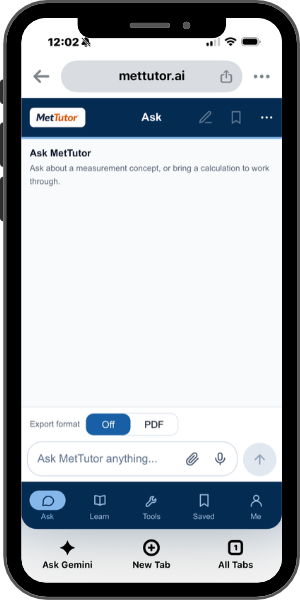
MetTutor’s mobile interface was designed from the ground up for clarity and speed. Everything you need — questions, practice, calculators and saved work — is one tap away. No clutter, no buried menus, no guesswork.
Everything is one tap away
The bottom navigation bar keeps MetTutor’s core areas within constant reach. Tap to switch between Ask, Learn, Tools, Saved, and Me — instantly, without scrolling or hunting through menus.
Ask
Jump straight into a conversation. Ask about a measurement concept, work through a calculation, or explore a standards topic — all in one place.
Learn
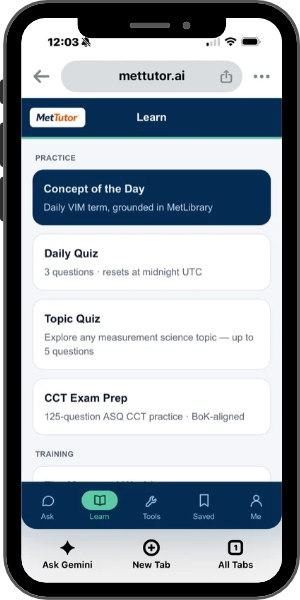
Access daily practice, topic quizzes, and CCT exam preparation. Structured learning modules are organized so you can build skills in focused sessions.
Tools
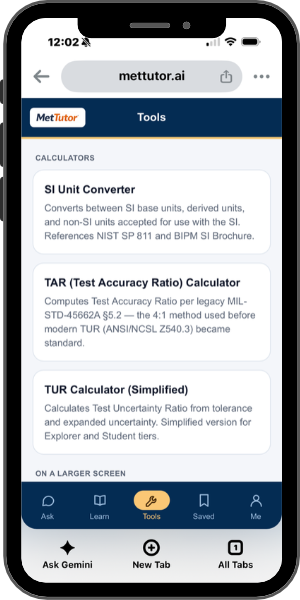
Open any of MetTutor’s metrology calculators — from SI unit conversion to TUR and TAR — directly from the bottom bar. No searching required.
Saved
Return to your saved conversations and results. Pick up right where you left off, whether you’re on the bench, in the lab, or between meetings.
Me
View your profile and account at a glance. Your plan, settings, and preferences are all in one place.
One conversation for everything
Ask MetTutor is the single entry point for every metrology question. Ask about concepts, work through step-by-step calculations, or explore standards topics — all in one unified conversation, grounded in MetLibrary’s foundational standards and principles.
Every response is cited in APA format so you can trace it back to its source. On mobile, the interface stays clean and focused: your question at the bottom, MetTutor’s response filling the screen, with an export toggle to save results as PDF when you need them.
No mode switching. No complexity. Just type your question — or say it — and get a grounded, cited answer.
Ask by voice — as naturally as speaking
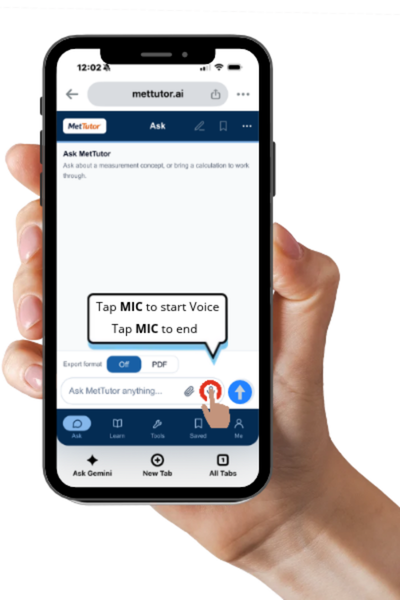
When your hands are busy with a calibration or your eyes are on the bench, voice input lets you ask MetTutor without typing a single character. It’s as simple as tapping a button.
Tap the mic
Tap the microphone icon to start voice recording. Speak your question naturally.
Tap to end
Tap the mic again when you’re done. Your spoken words appear as text in the input field.
Tap the blue button
Review your question, then tap the blue send button to submit it to MetTutor.
Build measurement science skills, one session at a time
The Learn tab organizes MetTutor’s practice and training tools into focused categories. Whether you have five minutes for a daily quiz or an hour for CCT exam preparation, the right tool is always one tap away.
Concept of the Day
A daily VIM term grounded in MetLibrary — a quick way to build your metrology vocabulary one concept at a time.
Daily Quiz
Three questions that reset at midnight UTC. A consistent daily habit to sharpen your fundamentals.
Topic Quiz
Choose any measurement science topic and answer up to five targeted questions to test your understanding.
CCT Exam Prep
125-question ASQ Certified Calibration Technician practice aligned with the Body of Knowledge.
Validated calculators, right on your phone
MetTutor’s deterministic calculators are available on mobile — the same exact-arithmetic engines used on desktop, optimized for a smaller screen. Every result is computed by validated code, not generated by the language model.
SI Unit Converter
Convert between SI base units, derived units, and non-SI units accepted for use with the SI. References NIST SP 811 and the BIPM SI Brochure.
TAR Calculator
Compute the test accuracy ratio per legacy MIL-STD-45662A §5.2 — the 4:1 method used before modern TUR became standard.
TUR Calculator (Simplified)
Calculate the test uncertainty ratio from tolerance and expanded uncertainty. Available on all plan tiers.
Additional Calculators
Full TUR, GUM Uncertainty Budget, Type B Estimator, Welch-Satterthwaite, and Decision Rules calculators are available on larger screens.
Designed for the lab, the bench, and everywhere between
Calibration work doesn’t happen at a desk. MetTutor’s mobile app is built for the reality of fieldwork — quick lookups between calibration points, voice-driven questions while your hands are occupied, and practice sessions during downtime.
Responsive Design
Every screen adapts to your device. Cards stack cleanly, text stays readable, and controls stay within easy thumb reach — phone or tablet.
Fast, Focused Answers
The mobile interface is streamlined for speed. Ask a question, get a cited answer. No sidebars, no distractions — just the information you need.
Export on the Go
Toggle export format directly from the Ask screen. Save any response as a PDF to reference later or share with colleagues.
Seamless Continuity
Start a conversation on your phone, pick it up on desktop. Your saved conversations and results travel with your account, not your device.
Measurement science, wherever you are
Open MetTutor on any mobile browser — no download required. The same platform, the same grounded answers, optimized for your phone.
Try MetTutor View Plans →NCSL International (NCSLI), the American Association for Laboratory Accreditation (A2LA), the American Society for Quality (ASQ), the American National Standards Institute (ANSI), the International Organization for Standardization (ISO), the International Electrotechnical Commission (IEC), the Joint Committee for Guides in Metrology (JCGM), the National Institute of Standards and Technology (NIST), and all other organization names, product names, and trademarks referenced on this page are the property of their respective owners. MetTutor is not affiliated with, endorsed by, or sponsored by any of these organizations.